Koppeling met de Import App. Integration with the Import App. Verbindung mit der Import App. Intégration avec l’Import App.
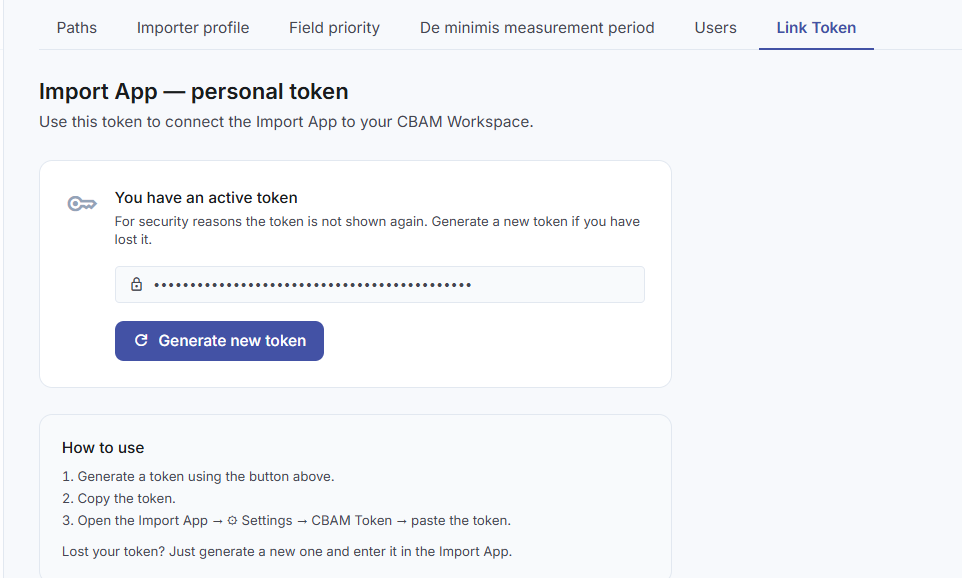
De Import App communiceert met de Workspace via een persoonlijk API-token. Genereer het token in de Workspace (Instellingen → Import App Token) en plak het in de Import App via het tandwielpictogram. Het token wordt verstuurd als HTTP-header bij elk verzoek. The Import App communicates with the Workspace via a personal API token. Generate the token in the Workspace (Settings → Import App Token) and paste it into the Import App via the gear icon. The token is sent as an HTTP header with every request. Die Import App kommuniziert mit dem Workspace über ein persönliches API-Token. Generieren Sie das Token im Workspace (Einstellungen → Import App Token) und fügen Sie es über das Zahnradsymbol in die Import App ein. Das Token wird bei jeder Anfrage als HTTP-Header übermittelt. L’application Import communique avec le Workspace via un jeton API personnel. Générez le jeton dans le Workspace (Paramètres → Jeton Import App) et collez-le dans l’application Import via l’icône d’engrenage. Le jeton est envoyé en tant qu’en-tête HTTP à chaque requête.
- 1Workspace → Instellingen → klik „Genereer token”. Kopieer de code direct — u ziet hem slechts één keer.Workspace → Settings → click “Generate token”. Copy the code immediately — you will only see it once.Workspace → Einstellungen → klicken Sie auf „Token generieren”. Kopieren Sie den Code sofort — Sie sehen ihn nur einmal.Workspace → Paramètres → cliquez sur « Générer un jeton ». Copiez le code immédiatement — vous ne le verrez qu’une seule fois.
- 2Import App → klik het tandwielpictogram rechtsboven → plak het token.Import App → click the gear icon top right → paste the token.Import App → klicken Sie auf das Zahnradsymbol oben rechts → Token einfügen.Import App → cliquez sur l’icône d’engrenage en haut à droite → collez le jeton.
- 3Klaar. Elke zending die u via „Next” verstuurt, arriveert automatisch in de Workspace.Done. Every shipment you send via “Next” arrives automatically in the Workspace.Fertig. Jede Sendung, die Sie über „Weiter” absenden, kommt automatisch im Workspace an.Terminé. Chaque expédition envoyée via « Suivant » arrive automatiquement dans le Workspace.
Automatisch aanleveren. Automated delivery. Automatisch anliefern. Alimentation automatique.
ERP-systemen, DMS-software en maatwerkkoppelingen kunnen zendingen automatisch aanleveren via de REST API. Het JSON-contract is eenvoudig en minimaal — de Workspace vult emissiefactor, ETS-prijs en CBAM-bedrag zelf aan. ERP systems, DMS software and custom integrations can automatically deliver shipments via the REST API. The JSON contract is simple and minimal — the Workspace adds emission factor, ETS price and CBAM amount itself. ERP-Systeme, DMS-Software und maßgeschneiderte Integrationen können Sendungen automatisch über die REST API anliefern. Das JSON-Contract ist einfach und minimal — der Workspace ergänzt Emissionsfaktor, ETS-Preis und CBAM-Betrag selbst. Les systèmes ERP, les logiciels DMS et les intégrations personnalisées peuvent livrer automatiquement des expéditions via l'API REST. Le contrat JSON est simple et minimal — le Workspace ajoute lui-même le facteur d'émission, le prix ETS et le montant CBAM.
EndpointEndpointEndpunktPoint de terminaison
POST https://cbam.tensig.nl/api/ingest
Content-Type: application/json
Dubbele verzending met dezelfde reference wordt als update verwerkt — geen duplicaat.
Duplicate submission with the same reference is processed as an update — not a duplicate.
Doppelte Übermittlung mit derselben reference wird als Update verarbeitet — kein Duplikat.
Une soumission en double avec le même reference est traitée comme une mise à jour — pas un doublon.
Minimale payload (vanuit ERP) Minimal payload (from ERP) Minimale Nutzlast (aus ERP) Charge utile minimale (depuis ERP)
Het ERP hoeft alleen de basisgegevens mee te sturen. De Workspace berekent emissiefactor, ETS-prijs en CBAM-bedrag zelf via Supabase. The ERP only needs to send the basic data. The Workspace calculates the emission factor, ETS price and CBAM amount itself via Supabase. Das ERP muss nur die Basisdaten senden. Der Workspace berechnet Emissionsfaktor, ETS-Preis und CBAM-Betrag selbst über Supabase. Le système ERP n'a besoin d'envoyer que les données de base. Le Workspace calcule lui-même le facteur d'émission, le prix ETS et le montant CBAM via Supabase.
{
  "reference":          "ERP-20260410-001",
  "external_reference": "INV-2026-00421",
  "date":               "2026-04-10",
  "declarant":          "Tensig BV",
  "created_by":         "ERP-systeem",
  "created_at":         "2026-04-10T14:30:22",
  "supplier":           "ArcelorMittal Trading BV",
  "origin_country":     "UA",
  "lines": [
    {
      "pos":           1,
      "cn8_code":      "72081000",
      "description":   "Hot rolled flat steel",
      "net_weight_kg": 18500.0
    }
  ]
}
Volledige payload (met installatie) Full payload (with installation) Vollständige Nutzlast (mit Anlage) Charge utile complète (avec installation)
{
  "reference":          "CBAM-20260410143022",
  "external_reference": "INV-2026-00421",
  "date":               "2026-04-10",
  "declarant":          "Tensig BV",
  "created_by":         "W. Blomsma",
  "created_at":         "2026-04-10T14:30:22",
  "supplier":           "ArcelorMittal Trading BV",
  "producer":           "ArcelorMittal Ukraine",
  "origin_country":     "UA",
  "de_minimis":         false,
  "cbam_certificate_type": "Y128",
  "lines": [
    {
      "pos":            1,
      "cn8_code":       "72081000",
      "description":   "Hot rolled flat steel, width >= 600mm",
      "origin_country": "UA",
      "net_weight_kg":  18500.0,
      "installation": {
        "name":             "ArcelorMittal Kryvyi Rih",
        "country":          "UA",
        "unlocode":         "UA KRV",
        "production_route": "BF-BOF"
      }
    }
  ]
}ResponsResponseAntwortRéponse
{
  "status":       "created",
  "shipment_ref": "CBAM-20260410143022",
  "shipment_id":  42,
  "errors":       []
}
Mogelijke statuswaarden: created | updated | duplicate | invalid | error
Possible status values: created | updated | duplicate | invalid | error
Mögliche Statuswerte: created | updated | duplicate | invalid | error
Valeurs de statut possibles : created | updated | duplicate | invalid | error
Aandachtspunten ERP-koppelingERP integration notesHinweise zur ERP-IntegrationPoints d'attention pour l'intégration ERP
- checkCN8-code in artikelstam — 8 cijfers per artikel bijhouden, dit is de kern van CBAM-classificatie.CN8 code in item master — maintain 8 digits per item, this is the core of CBAM classification.CN8-Code im Artikelstamm — 8 Ziffern pro Artikel pflegen, dies ist der Kern der CBAM-Klassifizierung.Code CN8 dans la base articles — maintenir 8 chiffres par article, c'est le cœur de la classification CBAM.
- checkHerkomstland per regel — idealiter per inkoopregel, niet alleen op headerniveau.Country of origin per line — ideally per purchase line, not just at header level.Ursprungsland pro Zeile — idealerweise pro Einkaufszeile, nicht nur auf Kopfzeilenebene.Pays d'origine par ligne — idéalement par ligne d'achat, pas seulement au niveau de l'en-tête.
- checkProducent vs. leverancier — sla de fabrikant apart op in de artikelstam of leveranciersstam.Producer vs. supplier — store the manufacturer separately in the item or supplier master.Produzent vs. Lieferant — den Hersteller separat im Artikel- oder Lieferantenstamm speichern.Producteur vs. fournisseur — stocker le fabricant séparément dans la base articles ou fournisseurs.
- checkRetries — bij herhaald verzenden stuurt dezelfde
referenceeen update, geen duplicaat.Retries — on repeated sending, the samereferencesends an update, not a duplicate.Wiederholungen — Bei wiederholter Übermittlung sendet dieselbereferenceein Update, kein Duplikat.Nouvelles tentatives — en cas d'envoi répété, le mêmereferenceenvoie une mise à jour, pas un doublon.